The collage, remotely, on a shared board
An AI Risks Collage workshop played in the browser, together, at the same time. One person facilitates, up to eight participants place the cards and draw the links. Nothing to install, no account to create.
Got a link by e-mail? Open your session.
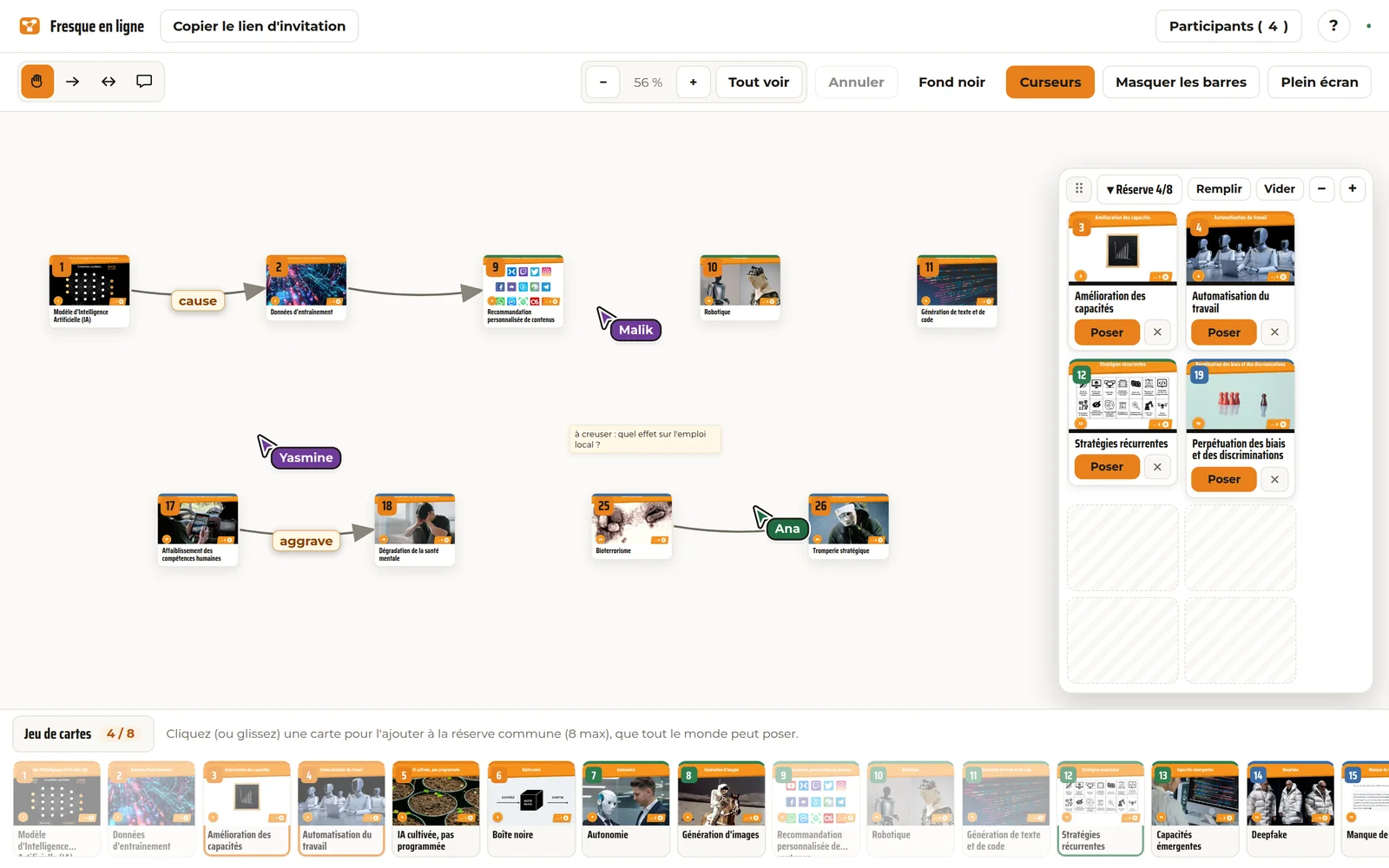
How it runs
How it works
- 1
Schedule the workshop
Date, time, number of seats, public or private. You get an e-mail with all your links: the one to share for sign-ups, the one that opens your session on the day, and the one to move or cancel it. No code to write down.
- 2
Participants sign up
Each person gets their own link by e-mail, plus a reminder the day before and an hour ahead. On the day, one click is enough: no code to retype, no account to create.
- 3
Build the collage together
The facilitator puts cards into the shared reserve. Everyone places them on the board, links them, annotates the links, adds notes, while the group talks over video.
What about the conversation?
A workshop scheduled with built-in video opens a room on our own Jitsi Meet instance, free software we host ourselves: no account, no big-company service, no tracking, and a unique link deleted after the workshop. The link appears right in the board.
Prefer your own tool (Discord, Google Meet, Teams…)? Just paste its link instead.
What the tool can do
- Place and link
Cards dragged from the reserve or placed with one click, one-way or two-way links annotated with a word, free-form notes anywhere on the board.
- Genuinely together
Everyone's cursor, cards sliding live as they are moved, text appearing as it is typed. Nobody waits their turn.
- Finding your way
Zoom by wheel, pinch or buttons, "Fit all" to reframe everything in one click, full screen, light or dark background. As you pull back, cards give way to their number and their family colour, and links stay clearly visible: a thirty-eight card collage reads at a glance.
- Undo
A shortcut (Ctrl+Z) or a button undoes your last action: a card removed by mistake, one link too many.
- Without a mouse
The whole board works from the keyboard: arrows to move between cards, Shift + arrows to move one, L to link, Enter to open.
- Reduced motion
If your system asks for fewer animations, the board removes them: nothing moves without reason, everything stays usable.
- The final image
One button downloads the finished collage as an image, ready to share.
Practical questions
What do I need to take part?
A computer or a tablet, a recent browser (Firefox, Chrome, Edge, Safari) and an ordinary connection. The link you receive by e-mail does the rest. On a phone the screen is really small for a thirty-eight card board: we do not recommend it.
How many people?
One person facilitates and up to eight take part, as around a table. That is the size that leaves everyone time to speak.
How long?
Allow three hours, as in person: about ninety minutes to build the collage, then the discussion. The facilitator's guide sets out the full course.
What if my connection drops?
Open the link again: you get your seat back and the board as it stands. Nothing is lost, the collage lives on the server and not in your browser.
What data?
For the board, only your first name is used, for the duration of the workshop; sessions are deleted automatically after a few hours of inactivity. Signing up for a scheduled workshop uses your e-mail, kept by Pause IA to run the workshop and erasable on request. Details in the legal notice.
What does it cost?
Nothing. The tool is free and open source, with no ads and no tracking. It is run by Pause IA, a non-profit.
A problem, an idea?
The tool is young and we improve it workshop after workshop: write to us, facilitators' feedback is what moves it forward.
Gather a group
Schedule your online workshop in two minutes, or sign up for one already open.
Prefer in person? Download the cards and gather a group around a table.